
1. INTRODUCTION
2. GENERAL CONCEPTS
3. FILES ASSOCIATED WITH THE PROGRAM
4. HOW TO WORK WITH THE PROGRAM
5. COMPOSITION OF THE AIRFOIL FILE
6. COMPOSITION OF THE INPUT DATA FILE leparagliding.txt
- SECTION 1: GEOMETRY
- SECTION 2: AIRFOILS
- SECTION 3: ANCHOR POINTS
- SECTION 4: LIGHTENING IN THE RIBS (RIB HOLES)
- SECTION 5: SKIN TENSION
- SECTION 6: SEWING ALLOWANCE
- SECTION 7: SEWING MARCAGE
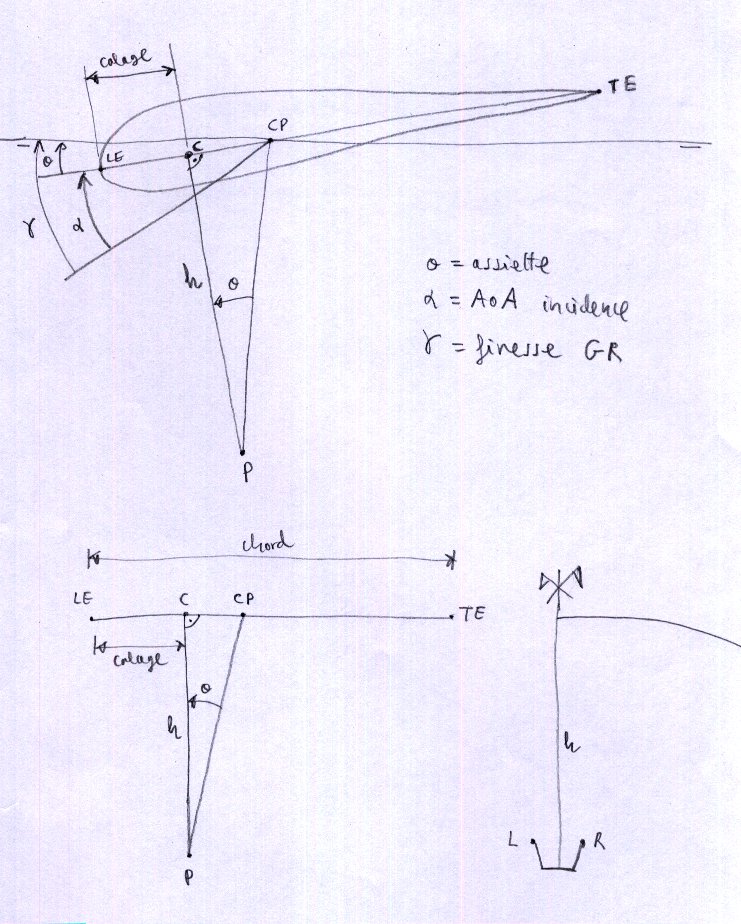
- SECTION 8: ESTIMATING THE GENERAL ANGLE OF ATTACK
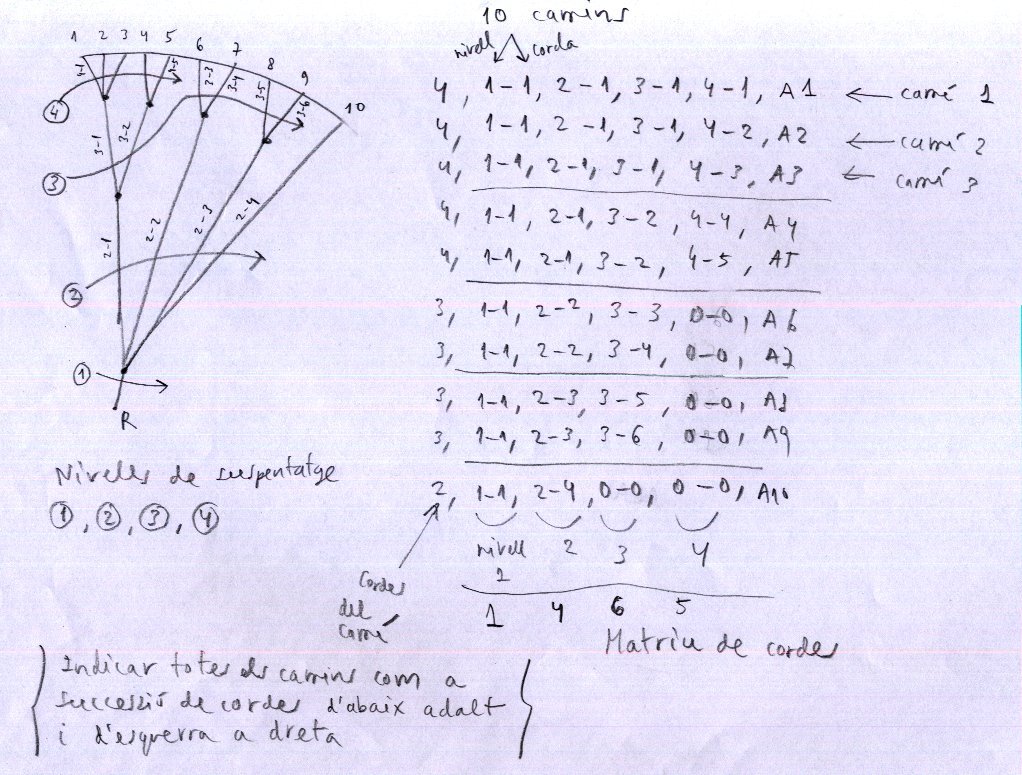
- SECTION 9: DESCRIPTION OF LINES
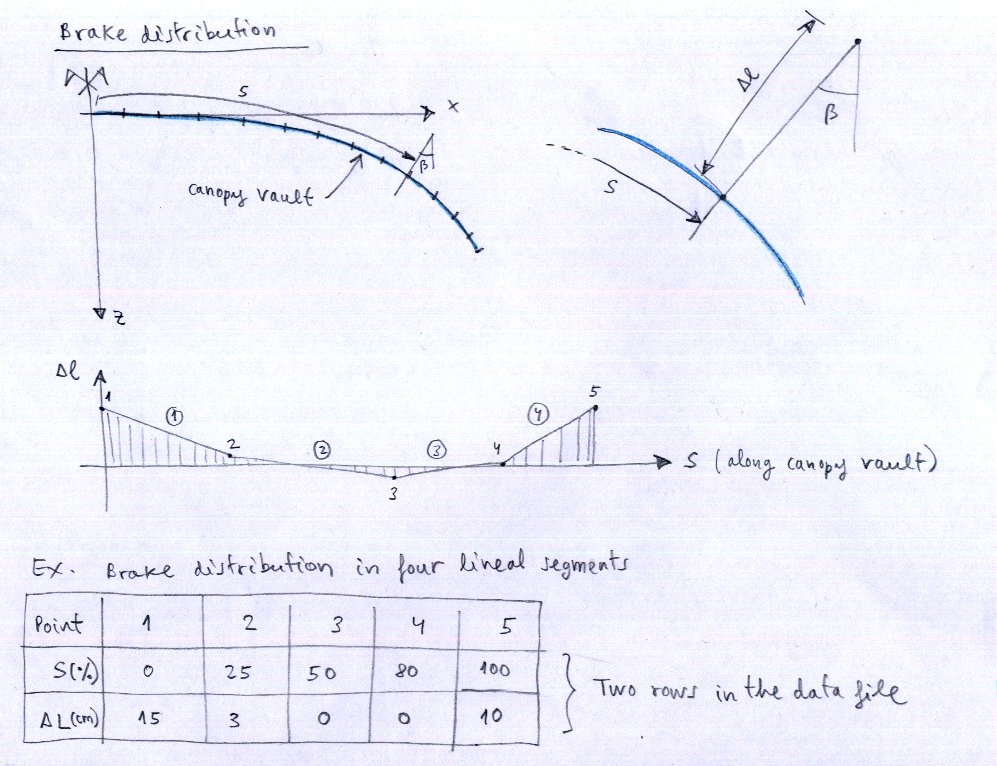
- SECTION 10: BRAKES
- SECTION 11: RAMIFICATIONS LENGTH
- SECTION 12: H V and VH RIBS
- SECTION 15: EXTRADOS COLORS
- SECTION 16: INTRADOS COLORS
- SECTION 17: ADDITIONAL RIB POINTS
- SECTION 18: ELASTIC LINES CORRECTION
- SECTION 19: DXF LAYERS NAMES
- SECTION 20: MARKS TYPES
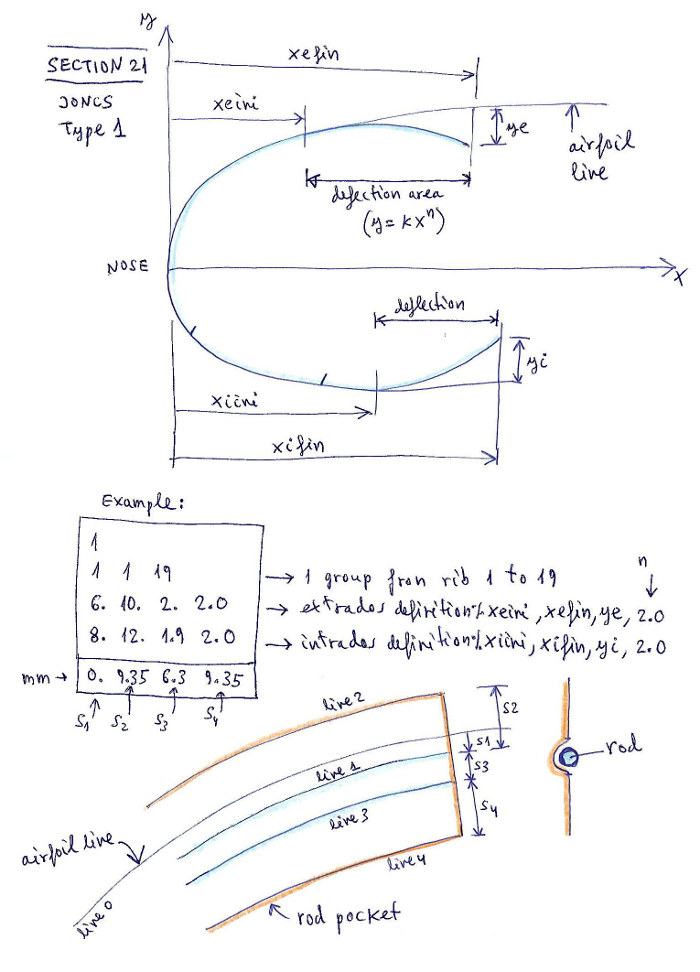
- SECTION 21: JONCS DEFINITION (NYLON RODS)
- SECTION 22: NOSE MYLARS DEFINITION
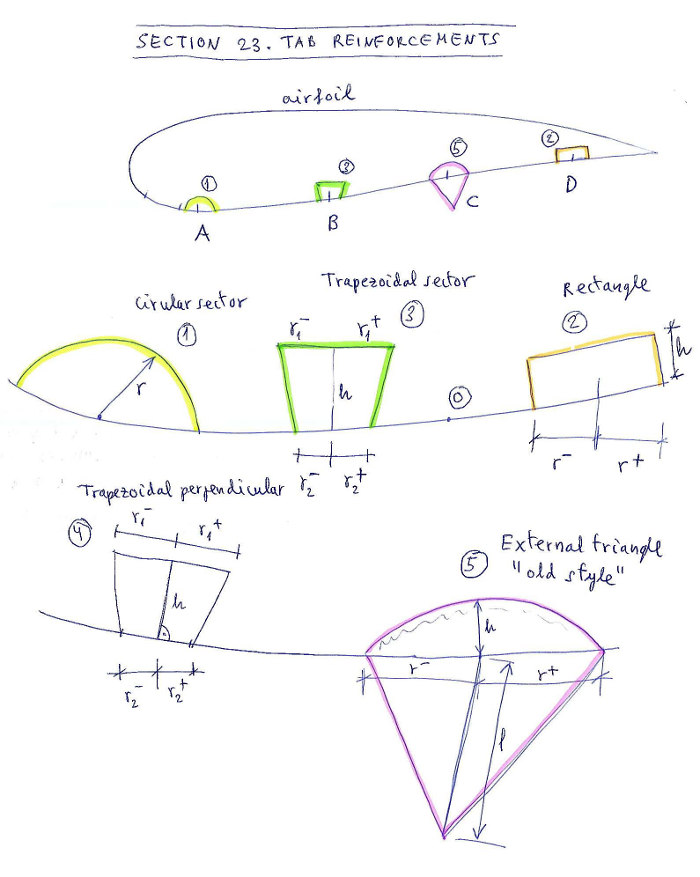
- SECTION 23: TAB REINFORCEMENTS
- SECTION 24: GENERAL 2D DXF OPTIONS
- SECTION 25: GENERAL 3D DXF OPTIONS
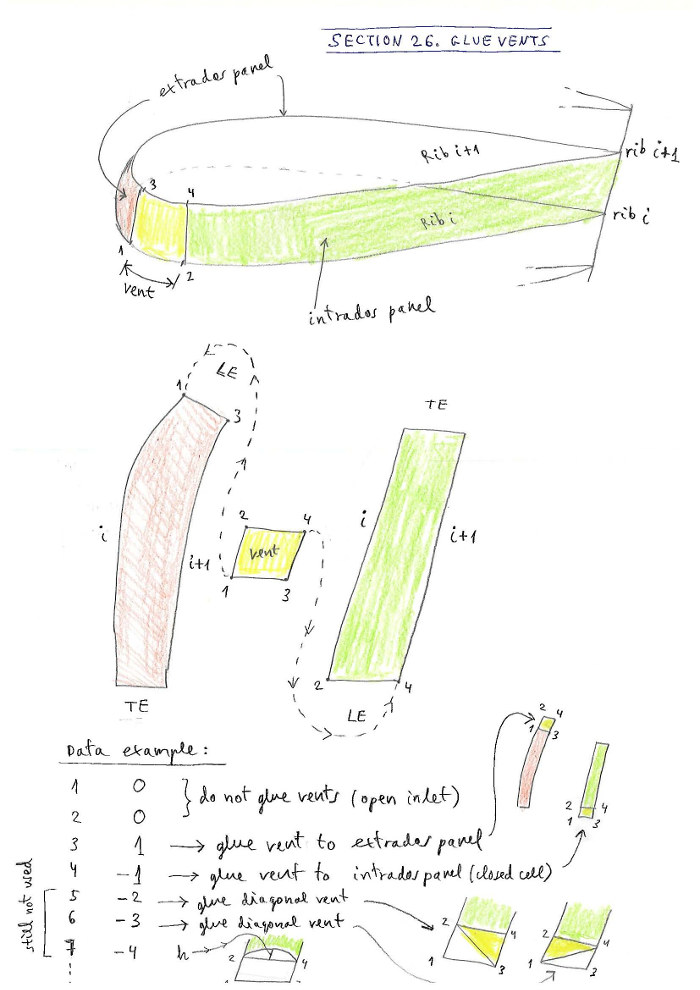
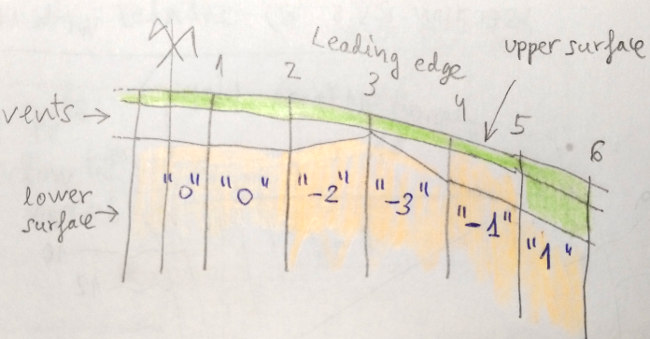
- SECTION 26: GLUE VENTS
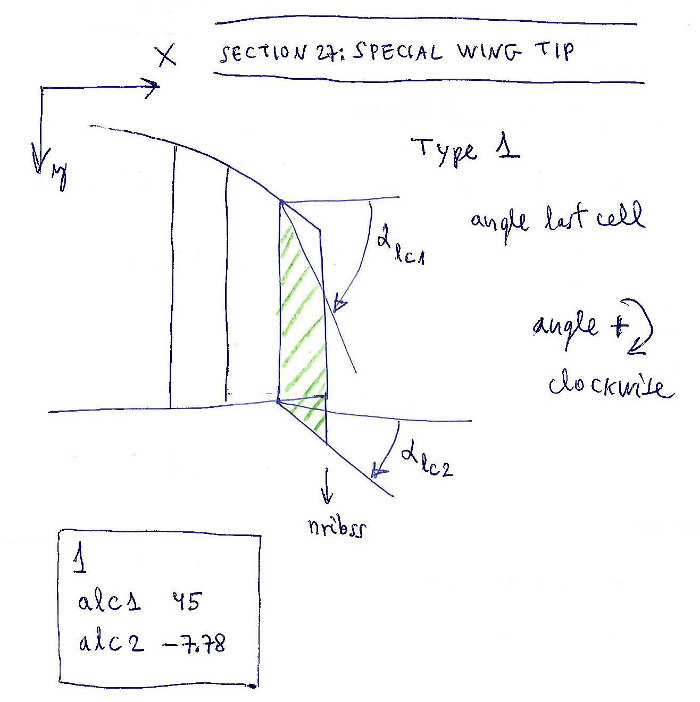
- SECTION 27: SPECIAL WINGTIP
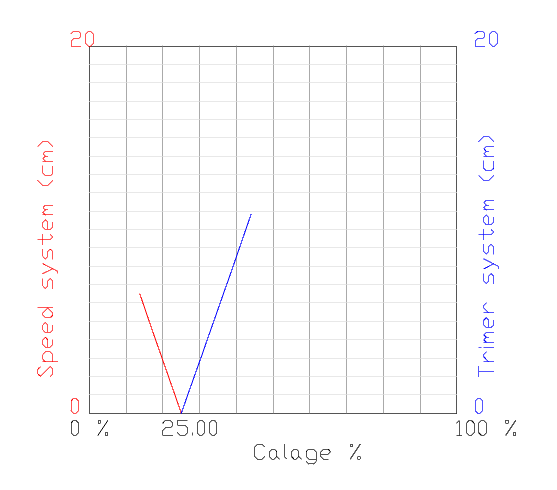
- SECTION 28: PARAMETERS FOR CALAGE SPEED AND TRIMER STUDY
- SECTION 29: 3D SHAPING
- SECTION 30: AIRFOIL THICKNESS MODIFICATION
- SECTION 31: NEW SKIN TENSION
- SECTION 32: PARAMETERS FOR PARTS SEPARATION
- SECTION 33: DETAILED RISERS
- SECTION 34: LINES CHARACTERISTICS TABLE
- SECTION 35: SOLVE EQUILIBRIUM EQUATIONS
- SECTION 36: CREATE FILES FOR XFLR5 ANALYSIS
- SECTION 37: SOME SPECIAL PARAMETERS
- SECTION 38: HVR HOLES
- SECTION 39: HVR POSITION PARAMETERS
FIGURE INDEX
- Figure 1: How to work with the program
- Figure 2: Airfoils definition
- Figure 3: Washin
- Figure 4: Axes and coordinates
- Figure 5. Miribs definition
- Figure 6. Parameter of rotation in "ss" paragliders
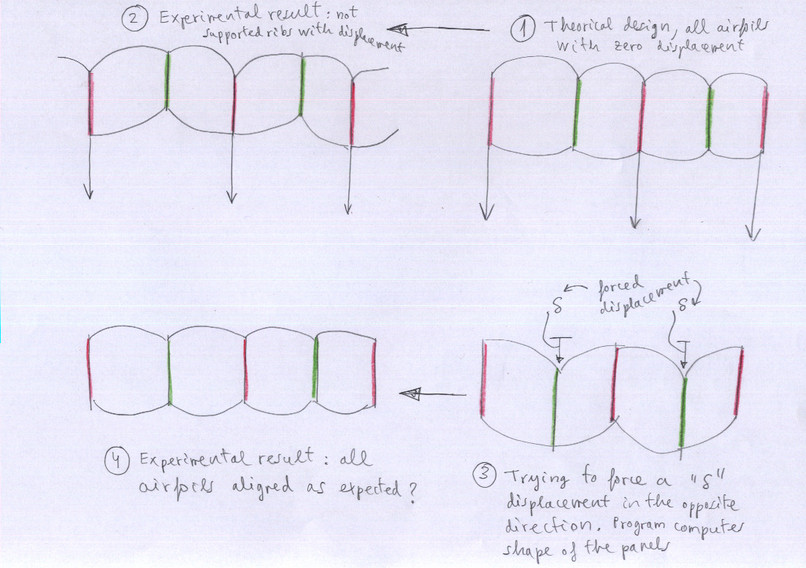
- Figure 7. Parameter delta of rib forced vertical displacement
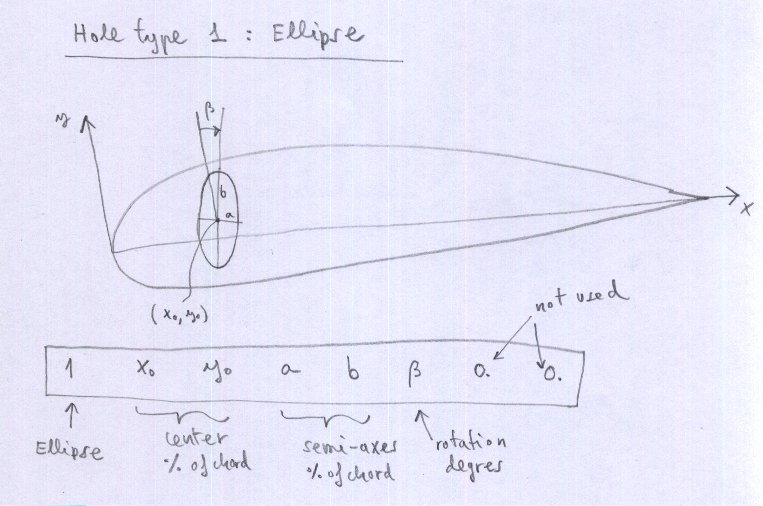
- Figure 8. Hole type 1, ellipse
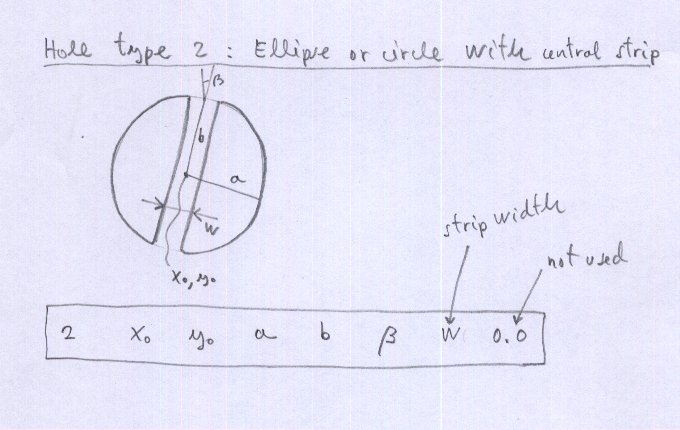
- Figure 9. Hole type 2, ellipse or circle with central strip
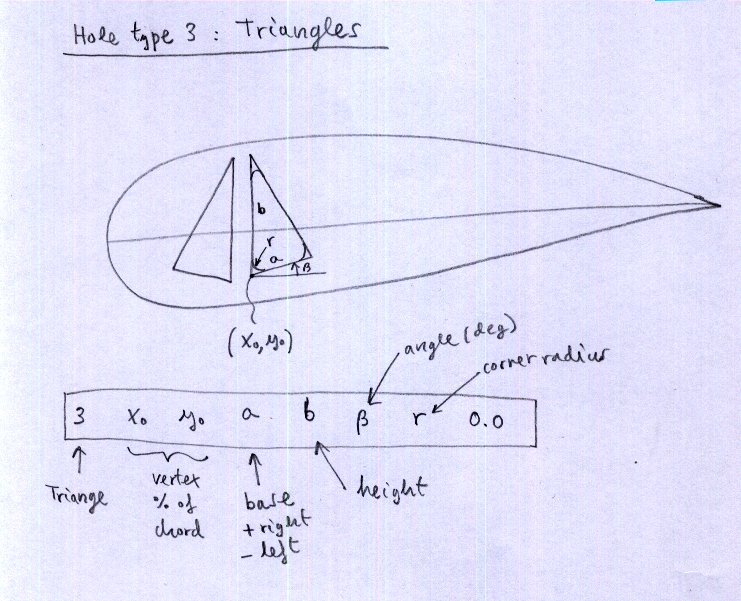
- Figure 10. Hole type 3 triangle
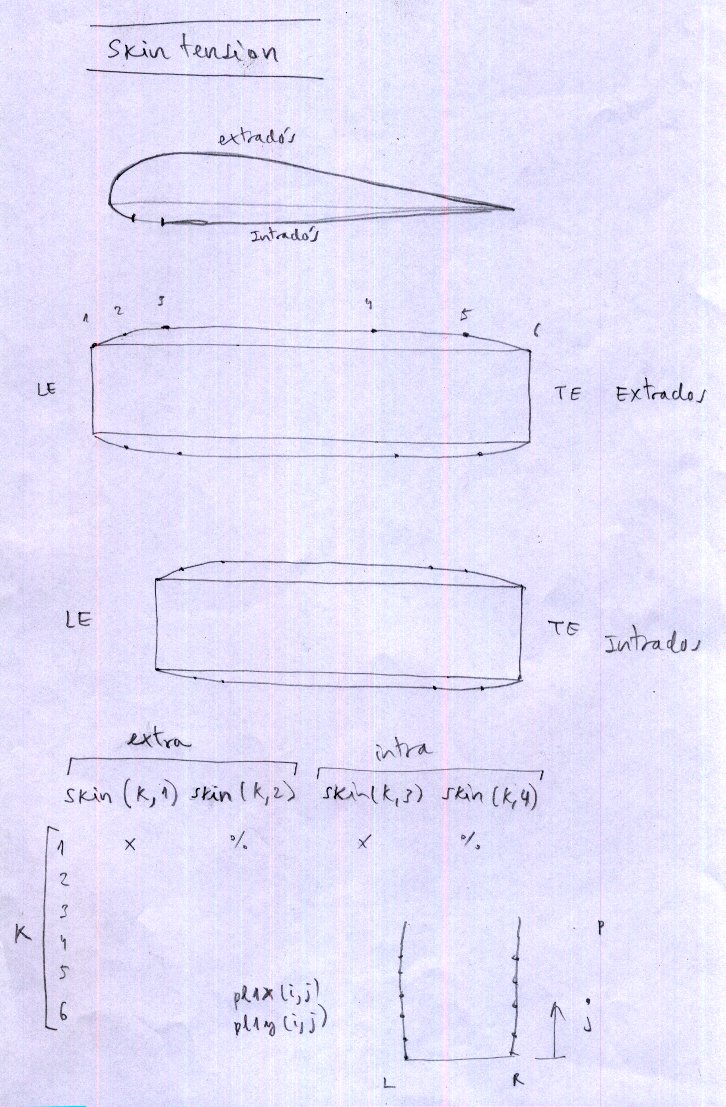
- Figure 11. Skin tension
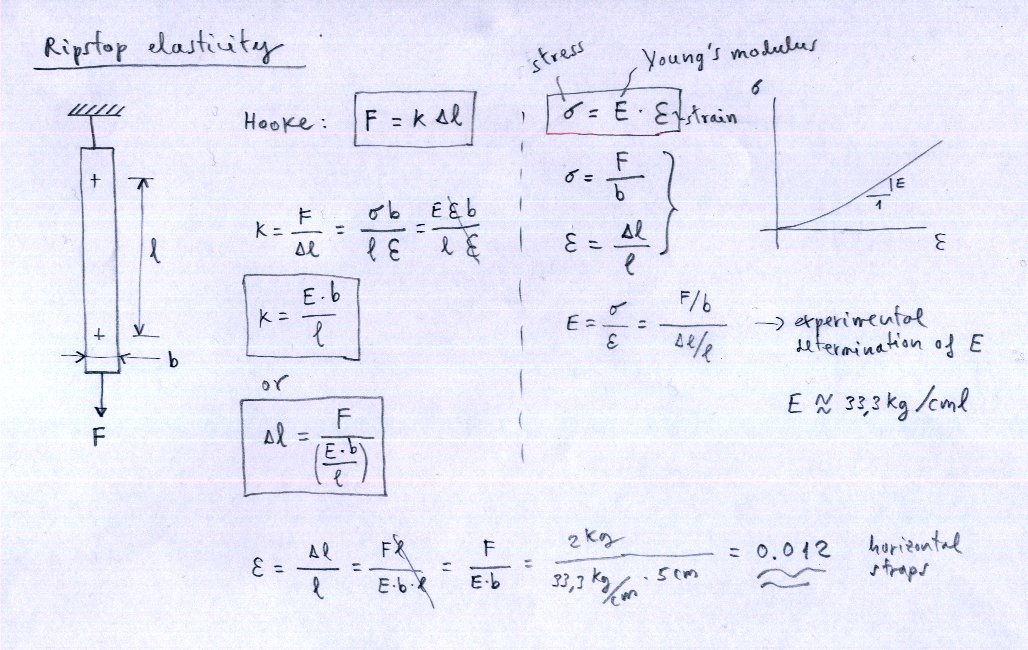
- Figure 12. Ripstop elasticity
- Figure 13. Sewing corrections
- Figure 14: General AoA estimation
- Figure 15: Suspension lines matrix
- Figure 16. Brake distribution
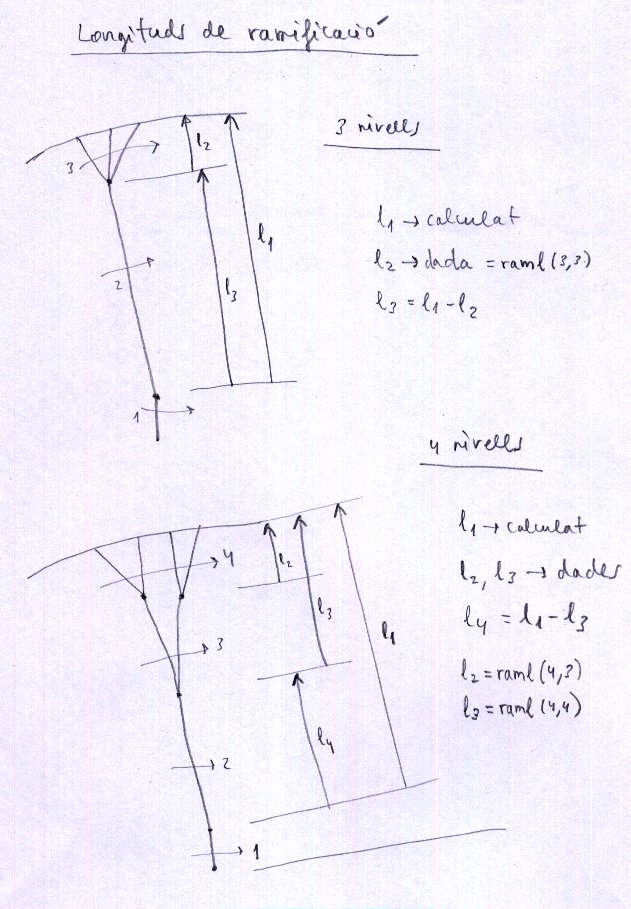
- Figure 17: Ramifications length
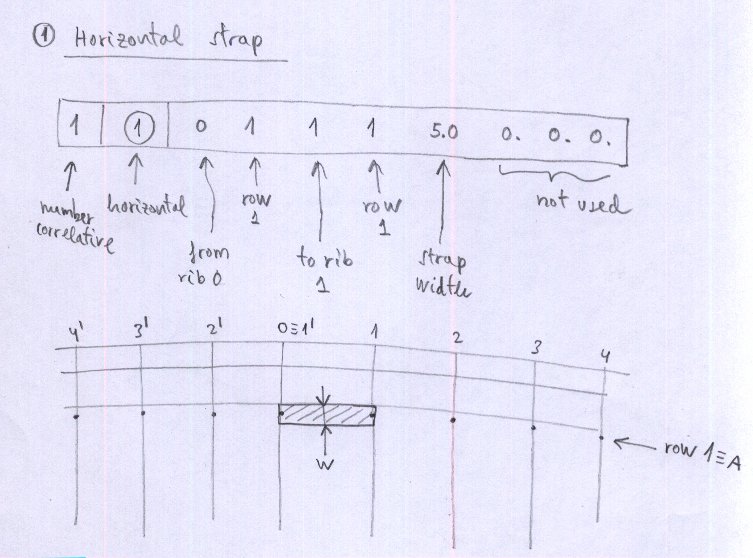
- Figure 18. Mini-rib 1 (horizontal strap)
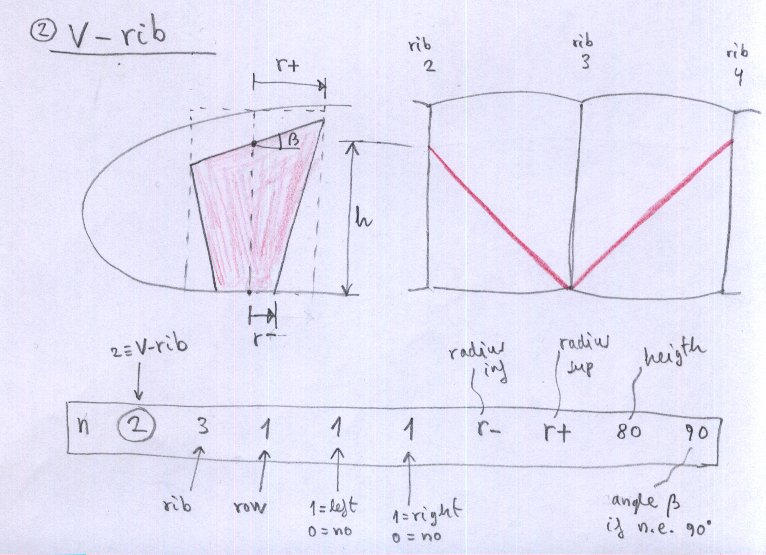
- Figure 19. Mini-rib 2 (V-rib)
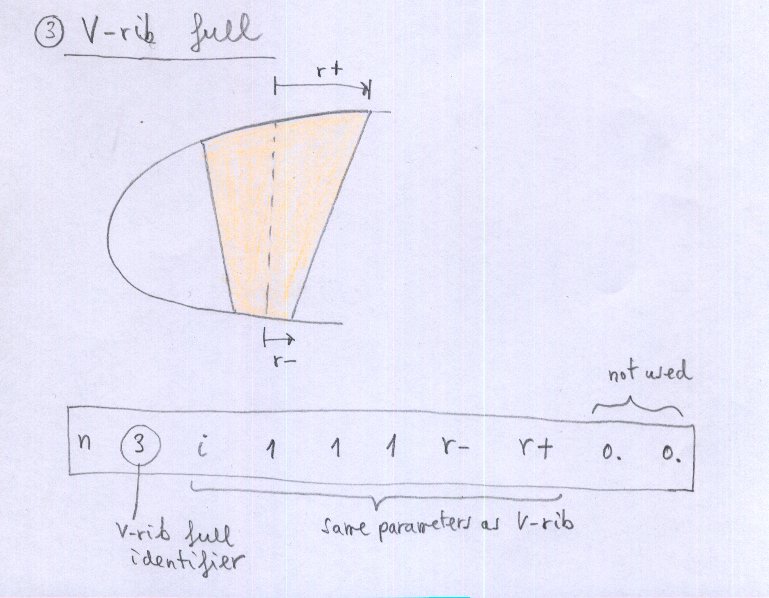
- Figure 20. Mini-rib 3 (full V-rib)
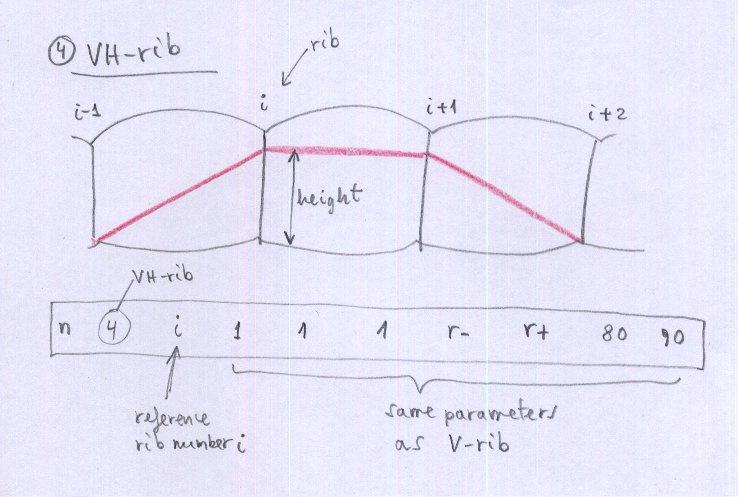
- Figure 21. Mini-rib 4 (VH-rib)
- Figure 22. Full continuous V-ribs type 5 using parabolic holes
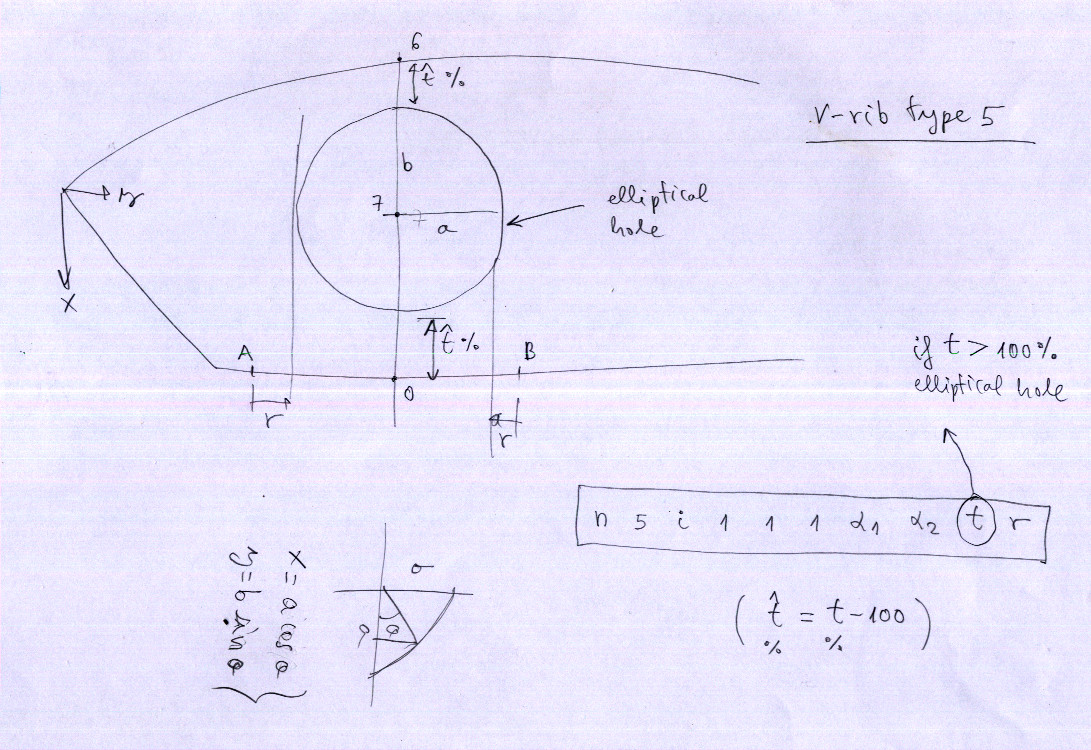
- Figure 23. Full continuous V-ribs type 5 using elliptical holes
- Figure 24. V-rib type 6 general diagonal
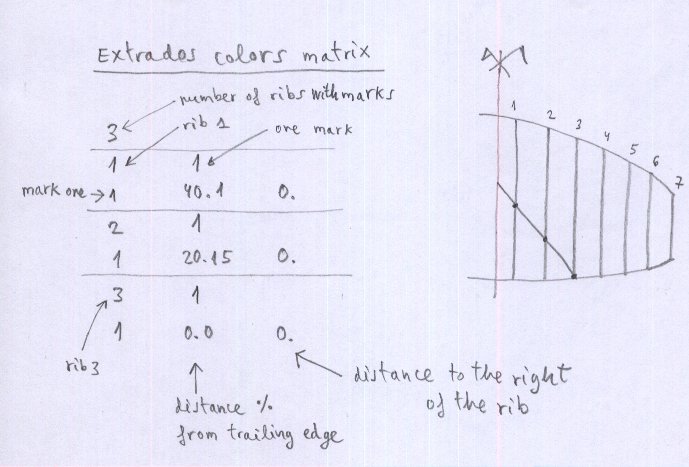
- Figure 25. Extrados colors
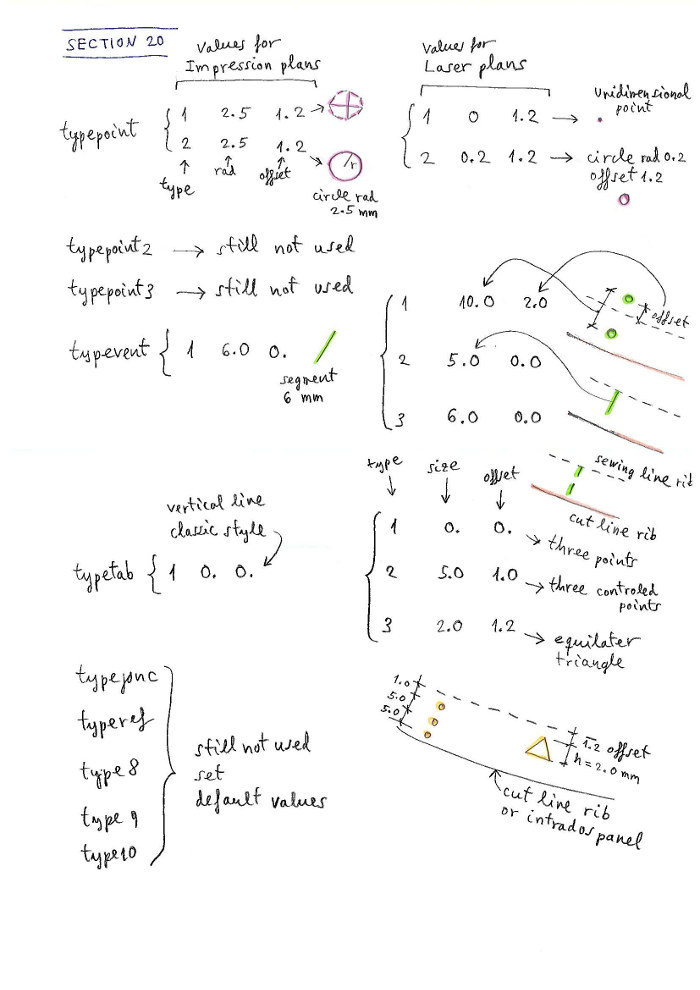
- Figure 26. Mark types
- Figure 27. Joncs definition
- Figure 28. Mylar definition
- Figure 29. Tabs definition
- Figure 30. Glue vents
- Figure 31. Vents types
- Figure 32. Special wingtips
- Figure 33. Calage variation principe
- Figure 34. Calage variation cases
- Figure 35. Calage graphic
- Figure 36. 3D shaping






1. INTRODUCTION
This manual describes the use of LEparagliding created by Laboratori d'envol for the design of paragliders. The author of the program provides no other information as described in the web. There is no warranty for the correct operation of the program. You assume the full consequences of use of the program.
LEparagliding is very "cryptic" to use, "FORTRAN style", but very powerful. FORTRAN is a programming language aimed at numerical calculation, which means FORmula TRANslation. It is a language that allows us to accurately translate the ideas of geometry and mathematics to a code that produces amazing graphical and numerical results.
The program implements the theoretical developed in the book "Paraglider Design Handbook", which is advisable to study, because many of the contents are complementary.
I apologize, because this manual provides explanations in a style slightly rough. It is possible that some subjects are poorly explained. I will be happy to provide further clarification by pm. The program is not perfect, but it works.
2. GENERAL CONCEPTS
LEparagliding is a calculation engine written in GNU FORTRAN language, that performs the reading the data of the input files, and writes the results to the output files.
Input files:
- leparagliding.txt – Contains detailed geometric definition of the entire paraglider. The designer must edit this text file to achieve the desired results.
- airfoil1.txt, airfoil2.txt, ...
- gnuC2.txt – They contain coordinate files of the profiles, taking a unit chord. Can be assigned a specific profile name of each rib. However the most common is a general airfoil applied to the entire wing and a zero thickness airfoil for the last profile of the wingtip.
Output files:
- leparagliding.dxf – Contains drawings in DXF format to be visualized, analyzed and edited with a CAD program (LibreCAD, Autocad, Microstation...)
- lep-3d.dxf – Dxf file created automatically by the program and contains 3D model (use 3D CAD program to view)
- lep-out.txt – Text output file with the main parameters calculated on the wing (span, area, aspect ratio, fineness, ...) and the ordered list of the lengths of all lines in the wing (main line plans and brakes).
- lines.txt – Text output file including the list of all lines labeled in a human readable format.
3. FILES ASSOCIATED WITH THE PROGRAM
- leparagliding.f – File program source code, written in language "GNU Fortran 77". This file is not necessary for the end user. Is included for developers who want to make modifications, improvements and extensions to the code, or for students. These changes are completely free under the principles and conditions of the GNU General Public License 3.0.
- leparagliding.txt – Text file that contains the main geometric definition of the glider model, whose detailed description is made below.
- gnua.txt – Text files containing the coordinates of the profile used. There may be many files you want to use many different profiles.
- lep-X.XX.out (Linux) or lep-X-XX.exe (Windows) – Executable program that must be activated to read the data and obtain graphical and numerical results.
- leparagliding.dxf – Dxf file created automatically by the program and contains all drawings of the wing panels with patterns ready to print or further postprocess in a CAD program.
- lep-3d.dxf – Dxf file created automatically by the program and contains 3D model.
- lep-out.txt – Text file with the numerical results of the program.
- lines.txt – Text output file including the list of all lines labeled in a human readable format. Note that some paragliders require experimental adjustments of the lengths of the lines compared to the theoretically calculated (BHL1 is the case).
- lep-3d-surface.dxf – Dxf file created automatically by the program and contains 3D model of the wing surface including ballooning.
- lep-3d-surface.stl – STL file created automatically by the program and contains 3D model of the wing surface including ballooning. STL file format will be used to visualize in 3D modelling programs like OpenSCAD and FreeCAD.
- run-log.txt – Contains a record of the same that is printed to the console when the program is executed. It can be useful to detect at which section the reading of the data stops if data is not in the expected format.
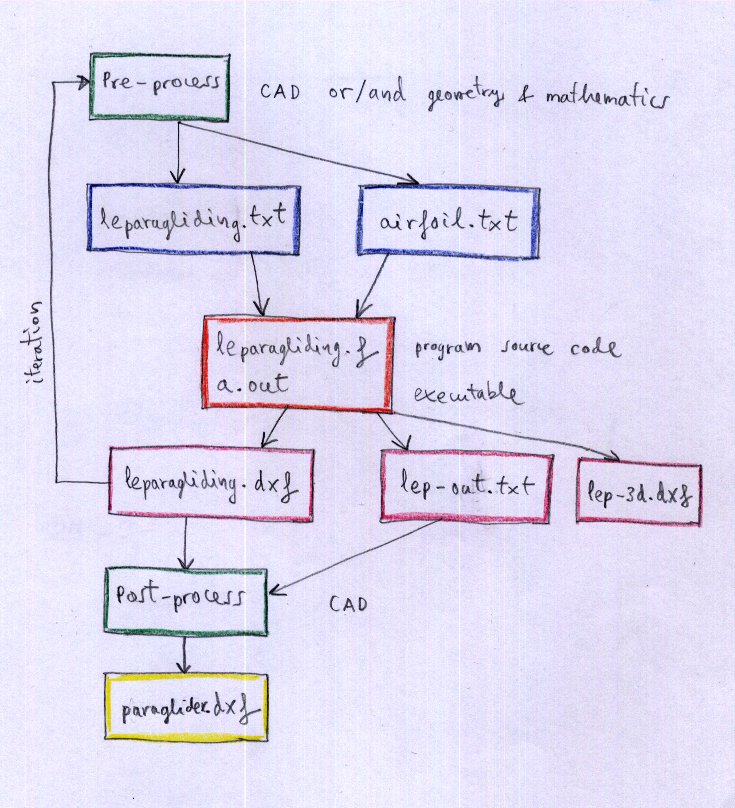
4. HOW TO WORK WITH THE PROGRAM
Working with LEparagliding consists of the following phases:
- Pre‑process – It is the initial phase of design, whether using CAD or pencil and graph paper and calculator. It defines the shape in plan, the lobe or vault and the desired inclination of the ribs. An analytical pre‑processor is available (is optional, and not strictly necessary), but very practical.
- Edit data file – Described below in detail. Complete sections 1 to 31. It is the most important operation, and the overall design of the glider itself.
- Program execution (seconds) – GNU/Linux: run ./lep-X.XX.out in a terminal. Windows: execute lep-X.XX.exe including one or more compatible cygwin .dll's in the same directory (or run ./lep-X.XX.out in a Cygwin terminal without the dll's). Mac OSX: compile source code in a terminal: "f77 leparagliding.f" and run "./lep-X.XX.out" in terminal as in linux (compiler name will be f77, g77, gfortran, or equivalent). Not tested yet.
- Viewing the drawings (CAD) – The program CAD displays the results dxf file. Please use 'zoom_extension' command.
- Iteration from stage 1 to achieve the desired layout.
- Post‑process CAD – Drawings can be edited by the CAD program to improve the presentation. They should position the panels and ribs on a reference template and print the templates in an array of A4/A3 size paper or plotter.
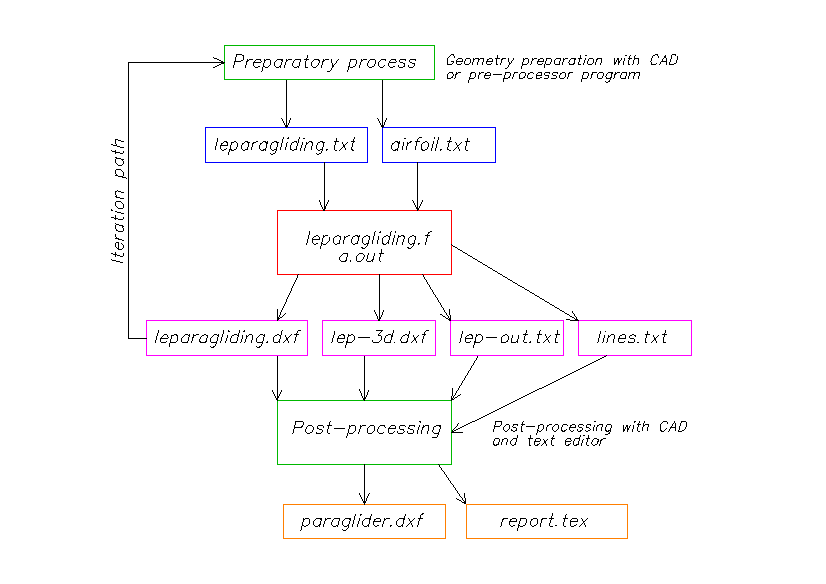
Figure 1: How to work with the program.
Since 2.23 version and additional file lines.txt is in the output.
Since 2.28 version and additional file run-log.txt is in the output.
.tex file still not available.
5. COMPOSITION OF THE AIRFOIL FILES
The file of the profile data must have the following structure:
- Line 1: name of the profile (do not use spaces in the name)
- Line 2: total number of points defining the profile
- Line 3: number of points that form the extrados (upper surface)
- Line 4: number of points that form the opening (if any)
- Line 5: number of points that form the intrados (lower surface)
- Following lines: X coordinate Y coordinate of each point of the airfoil
The coordinates are ordered starting at the trailing edge, covering the top surface, passed through the leading edge and coming through the lower surface and again ending at the trailing edge.
Important: The endpoint of the extrados must exactly match the start in % of the opening (air inlet), and the starting point of the intrados must exactly match the end in % of the opening (air outlet). Therefore the airfoil must be processed prior in a CAD program to achieve this. Therefore if you want to vary the start and end points of the air openings along span, you must detail specific profiles for this. Init and end points of openings declared in leparagliding.txt file must be consistent with the selected airfoils.
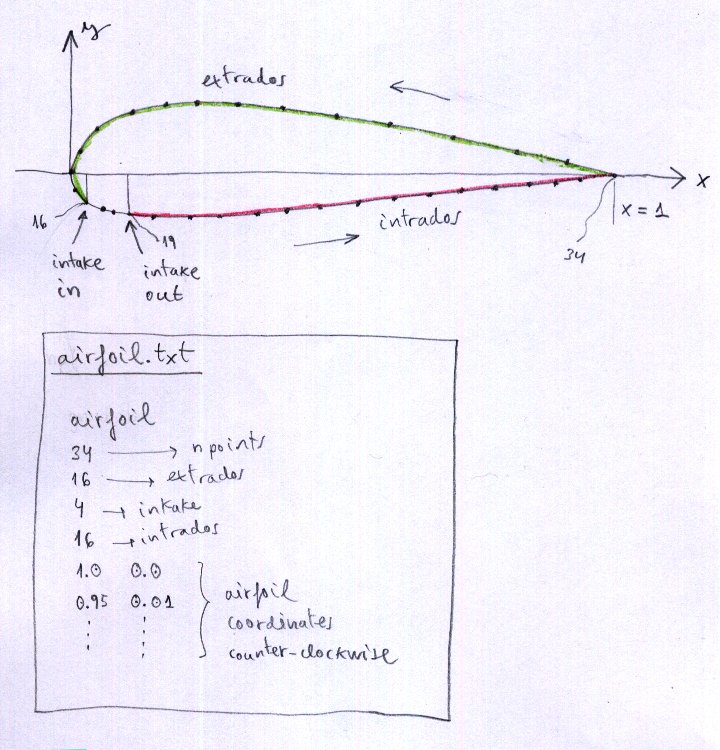
Figure 2: Airfoils definition
It is essential that the number of points of extrados, openings, and intrados, and all are exactly the same for all profiles defined in a wing model.
The maximum number of points allowed per profile is 500.
Zero‑thickness wingtip airfoil:
Usually, you must define a profile of zero thickness for the final profile of the wingtip. It is advisable to move the end of the panel's top surface (upper panel) to 0% of the profile, and keep the same number of points for each item (upper panel "extrados", air intakes, bottom panel "intrados"). This zero thickness profile is not necessary to define if we use the amplification coefficients of section 30 so that the coefficient applied to the last profile is 0.0.
6. COMPOSITION OF THE INPUT DATA FILE
Designing the paraglider is simplified to editing the file leparagliding.txt either creating it from scratch or, most commonly and recommended, by editing an existing model.
Very important, to take into account:
- All lines that begin with the symbol "*" are comments that are not used by the program, although you must maintain it to keep the sequence of reading.
- It is not allowed to add blank lines.
- Each line must contain the expected number of parameters and from the expected type (integer, real, text, boolean).
- Once the expected parameters have been completed, comments can be added to the same line, which will not be read by the program.
The main units planned for the data file are centimeters (cm), except sewing allowances in section 6, and some values in section 20 and 21 will be expressed in mm. Optionally, you could use inches and tenths of inches, but this has not been tested ever and not recommended.
You must fill in all the necessary parameters section by section until the end of the file, following this manual. I insist that the most practical thing is always to start with an existing template.
For each line of the data file, we will explain the type of parameter and its meaning. The graphic diagrams are very important to understand what type of parameter we are referring to. The order, data type, and number of rows is essential for a correct reading of the data file.
SECTION 1: GEOMETRY
Lines 1‑8:
* LABORATORI D'ENVOL PARAGLIDING DESIGN          *
* Input data file 3.28 version                   *
**************************************************************
* Version 2026-05-01                              *
**************************************************************
*                    1. GEOMETRY                  *
**************************************************************
Lines 9 to 24:
- text : Brand name (between " ")
- text : Wing name (between " ")
- real : Drawing scale (1.0 usual value)
- real : Wing scale (1.0 usual value)
- integer : Cells number
- integer : Ribs number
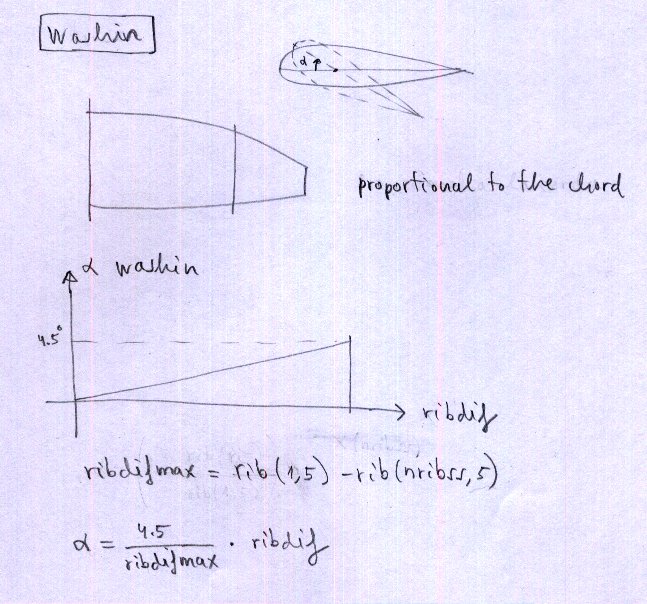
- real1 integer real2 : Alpha wingtip, parameter, (alpha center) – see description below.
- text boolean : Paraglider type "ds" double surface, "ss" single surface, or "pc" parachute. Boolean set to 0 or 1. If 1 then leading edge triangles will be not rotated (only used in ss paragliders).
Alpha wingtip, parameter, (alpha center):
real1: Maximum torsion angle (washin) between central airfoil and tips.
integer: 0, 1, or 2. If 0 → manual washin; if 1 → washin proportional to chord, maximum at tip; if 2 → automatic washin from center to tip (first real is tip washin, last real is center washin).
real2: angle of attack in the center (only for case 2).
Example: 3.5 2 -1.0 → tip AoA 3.5°, case 2, center AoA -1.0°. Distribution proportional to chord.
Paraglider type:
"ds": double surface airfoils (intrados and extrados)
"ss": single skin paragliders – intrados not drawn, but need special sawtooth profile.
"pc": parachutes using double surface airfoils.
boolean: set to 0 or 1. If 1 then leading edge triangles will be no rotated (only in ss).
Lines 25 and 26:
* Rib geometric parameters
* Rib    x-rib      y-LE      y-TE      xp      z      beta     RP     Washin    Rot_z   Pos_z
Lines 27 and following: geometric properties of each rib (geometry matrix).
For each rib, and considering an orthonormal system of axes XYZ (Figure 4): X axis along the wingspan, Y axis along the central chord, Z axis vertical from the wing to the pilot.
Write in a horizontal line the following 11 parameters (parameters 10 and 11 are not mandatory):
- integer : rib number
- real : rib X coordinate
- real : Y coordinate of the leading edge
- real : Y coordinate of the trailing edge
- real : X' coordinate of the rib in its final position in space
- real : Z coordinate of the rib in its final position in space
- real : angle "beta" of the rib to the vertical (degrees)
- real : RP percentage of chord to be held on the relative torsion of the airfoils
- real : washin in degrees defined manually (if parameter is set to "0")
- real : angle of rotation of the profiles with respect to a vertical axis Z (degrees)
- real : numeric value expressed as a percentage of the chord, where to place the vertical axis of rotation of the profiles
This is one of the most important parts of the wing definition process. These parameters can not be defined without a previous drawing, preferably in a CAD file, in which the desired plant is drawn to an appropriate scale, vault shape (wing arc), and inclination of the ribs on three axes. This drawing is one of the most basic and important design (pre‑process).
It would be possible to generate this drawing by a geometric preprocessor to read basic data from the wing desired number of cells, separation, size, shape, edge and trailing by a few parameters defined to create elliptical shapes. This optional pre‑processor has been implemented, but not inside the main program, because we prefer to keep this important part of design with a CAD program, to allow total freedom of the shape of the leading edge, trailing edge, and in the elevation, and inclination of the profiles. Any design is possible, normal wings, or bionic type, with peaks in leading edge or any other form. The pre‑processor is very useful and generates the geometry matrix that can be copied directly into this section. We are thinking about how to improve the pre‑processor to make it more intuitive, possibly with an html interface.
To define profiles at the center of the wing geometry, use the trick of defining a central cell of zero thickness.
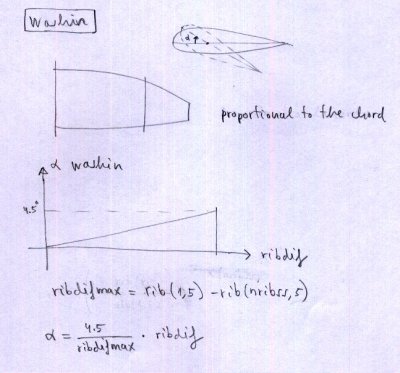
Figure 3. Washin
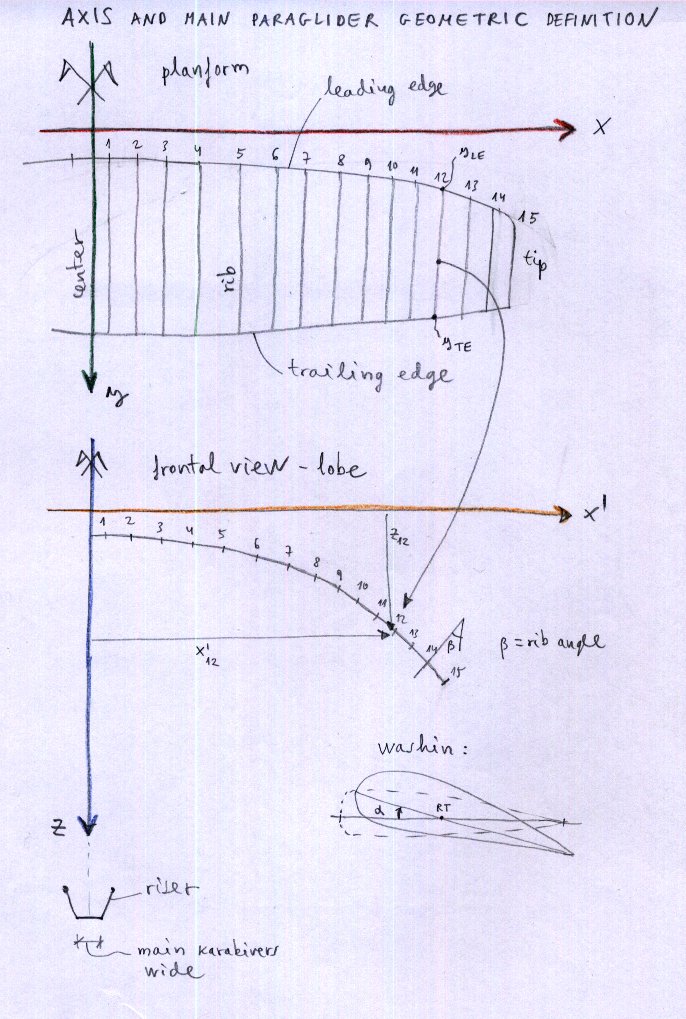
Figure 4. Axis and main paraglider geometric design

Figure 5. Only in "ss" paragliders, the parameter set to 0 or 1. If "1" then leading edge triangles will be no rotated. Control over specified ribs will be done using a real parameter 0.0 or 1.0 in last column of section 2, as explained below.
Note: Maximun allowed number of ribs is 100 per side (200 ribs or 199 cells).